AI interior design vs hiring an interior designer

Before you redo a room, one question usually decides everything else: do you hire an interior designer, or try an AI redesign first? They solve different problems, and cost is the cleanest way to see the difference. A designer brings judgment, sourcing, and hands-on project management. An AI tool gives you fast visual direction for the price of a few minutes and a photo. This guide breaks down what a designer does and the ways they charge, what AI room design costs in time and money, and a clear, side-by-side view of when each one is the right call. You will also see how to use AI first to sharpen your direction, so that if you do hire a professional, you brief them better and waste less of their billable time. You can test any look on your own room with MINIROOM AI before you spend on either path.
What an interior designer actually does, and how they charge
An interior designer is more than someone with good taste. The job is part creative direction, part logistics. A designer reads your space and your life, sets a coherent direction, then carries it through to the last cushion. The work usually covers space planning and layout, a palette and material scheme, sourcing furniture and finishes, coordinating trades like electricians and painters, and managing a budget and timeline. The further you go past pretty pictures into ordering, scheduling, and supervising, the more of the value sits in the management, not the mood board.
How they bill varies widely, and the right structure depends on the size and shape of your project. These are the common models, framed in general terms rather than fixed prices.
- Hourly. You pay for time, typically at a professional rate that varies a lot by city and experience. This suits small, defined jobs and consultations where you mainly want expert eyes for a few hours.
- Flat fee or per-room fee. A single agreed price for a defined scope, such as one room start to finish. The tighter the brief, the more accurate the quote, and the fewer surprises later.
- Percentage of project, or cost-plus. The fee is tied to the total spend, either as a percentage of the project cost or as a markup added to the furnishings and materials the designer buys for you. This is common on larger renovations where sourcing and purchasing are a big part of the work.
Treat any number you read online as a broad, general signal, not a quote. Real figures vary widely by region, by the designer's experience, by the scale of the project, and by how much sourcing and trade coordination it involves. The only price that means anything is the one in a written proposal for your specific room.
What AI room design does, and what it really costs
AI interior design works from a different starting point. Instead of a person interpreting your space over weeks, a tool reimagines a photo of your actual room in a style you choose, usually in under a minute. You photograph the room, pick or describe a look, and get back a redesigned version you can compare, save, and share. It does not order furniture or send an electrician, but it answers the question most people get stuck on first: what could this room look like?
The cost falls into two honest buckets.
- Money. Far less than professional fees. Many AI design apps run on a free tier or a modest subscription, so the financial risk of trying a direction is close to nothing next to a designer's hourly rate or project fee.
- Time. Minutes, not weeks. You can generate several versions of a room in the time it would take to schedule a first call with a designer, which makes it easy to explore widely before you commit.
What you trade for that speed and low cost is judgment and execution. AI gives you a convincing picture; it does not measure your ceiling height, vet a contractor, or tell you the sofa is too big for the traffic flow. It is a visualization tool, and it is genuinely good at that job. If you are weighing which tool to start with, our guide to the best AI interior design app walks through what to look for.
AI versus a designer: an honest side-by-side
Neither option is better in the abstract. The right one depends on what your project needs. Here is a straight comparison so you can place your own room.
AI is usually enough when you are:
- Exploring styles and want to see several directions quickly before deciding anything.
- After quick visual direction for a room, not a full set of construction plans.
- Doing a small refresh, such as paint, a new palette, or swapping a few key pieces.
- Working to a tight budget where a professional fee is simply out of reach right now.
- Trying to settle a disagreement at home about how a room could look.
It is worth hiring a professional when your project involves:
- A full renovation, where layout, lighting, and finishes all change at once.
- Structural or trade work, such as moving walls, plumbing, or electrical, where a mistake is expensive or unsafe.
- Sourcing and project management, where you want someone to procure everything and run the schedule for you.
- Accessibility or code requirements, where decisions have to meet real standards rather than just look good.
- High stakes or a large budget, where expert judgment pays for itself by preventing costly errors.
A useful rule of thumb: the more your project is about deciding how a room should look, the more AI can carry it. The more it is about building, sourcing, and coordinating, the more you want a professional. Many people use both.
Use AI first, then brief a designer better
These two paths are not rivals. Used in sequence, AI makes a designer cheaper. Most billable hours early in a project go into figuring out what you want, and that is exactly the part you can do yourself with an AI tool before the meter starts.
- Clarify your direction first. Generate several looks for your room and notice what you keep coming back to. If you are not sure what you are drawn to, our guide on finding your interior design style helps you name it, and the overview of interior design styles shows the main families side by side.
- Bring images, not adjectives. Walking into a consultation with saved AI redesigns of your actual room is far more useful than saying you want something cozy but modern. Concrete references cut the back-and-forth dramatically.
- Spend the professional's time on judgment. Once the look is roughly settled, a designer can focus on what only they do well: layout, sourcing, trades, and execution. That is where their fee earns its keep, and the saved AI versions give you both a shared visual anchor.
Doing the exploration up front does not replace a designer on a complex job. It just means you hire one for the hard parts instead of paying them to discover your taste with you.
How to try a redesign on your real room with MINIROOM AI
The fastest way to know which path you need is to see your own room redesigned, not a stranger's. That is what MINIROOM AI is for. You can test a whole look on your actual space from your phone, with the app on Google Play, before spending on furniture or fees.
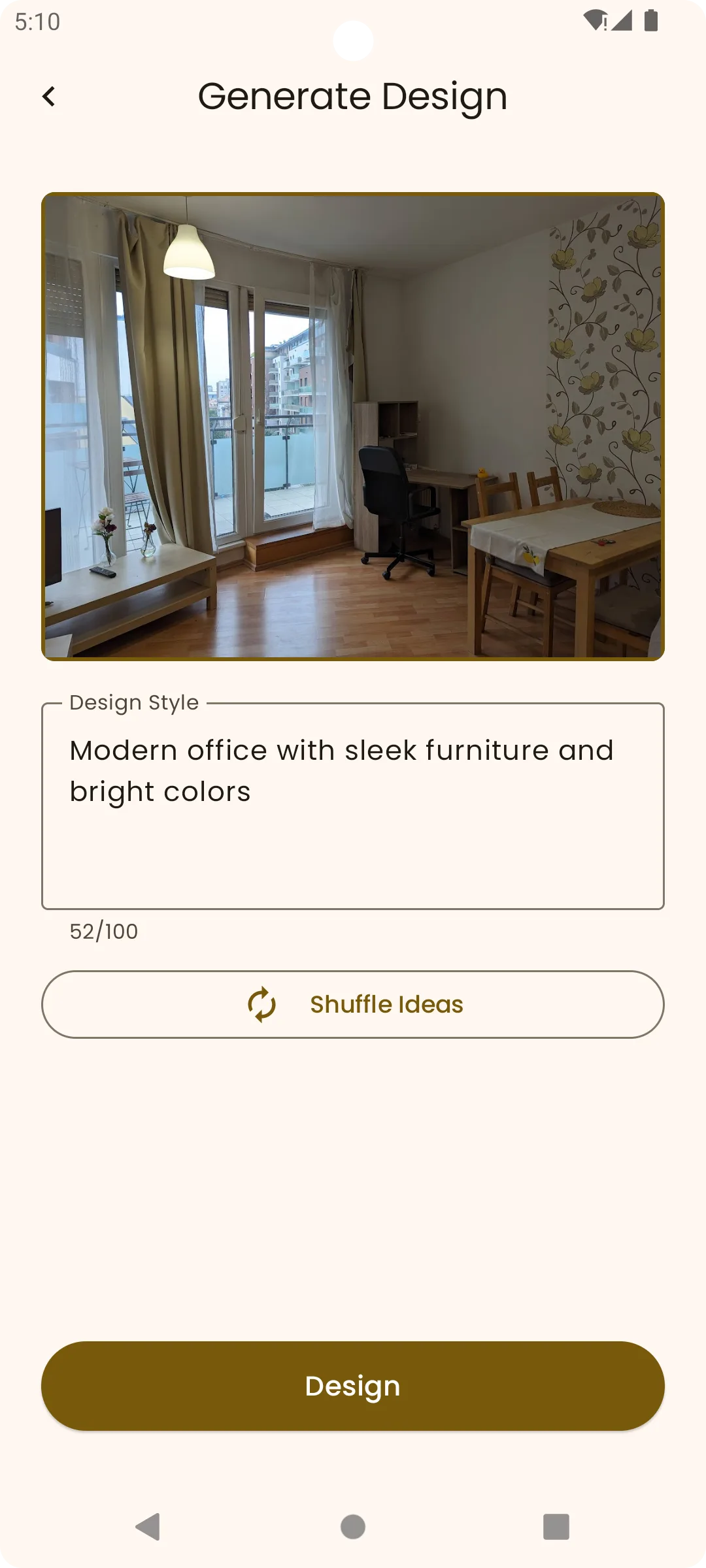
- Photograph the room. Stand back and capture as much of the space as you can in good daylight. A clear, wide shot gives the AI the most to work with.
- Prompt a style. Choose or describe the look you want to test. The more precisely you name it, the sharper the result, so a specific style beats a vague mood.
- Generate the redesign. The app reimagines your real room in that style, keeping your actual walls, windows, and proportions, so the result reflects your space rather than a showroom.
- Compare side by side. View the redesign against your original to judge whether the look genuinely suits the room, the light, and the layout you live with.
- Save the ones you like. Keep your favorite versions, compare a few against each other, and use the winner either as a finished direction or as a brief for the designer you hire.
If a few minutes of generating gives you a room you are happy with, you may not need to hire anyone. If it reveals the job is bigger than you thought, you now have clear images to hand a professional. Either way, you spent almost nothing to find out.
Try AI room design before you hire.
Open MINIROOM AI on Google Play, photograph the room, and see your options in seconds.

Frequently asked questions
How much does an interior designer cost?
It varies widely, so treat any figure you see as a broad, general signal rather than a quote. Designers typically charge in one of three ways: by the hour, as a flat or per-room fee for a defined scope, or as a percentage of the project cost or a markup on the items they source for you. The real number depends on your region, the designer's experience, the size of the project, and how much sourcing and trade coordination it involves. The only price that means anything is one written for your specific room.
Is AI interior design cheaper than hiring a designer?
In money, almost always yes. Many AI design apps run on a free tier or a modest subscription, which is far below a professional's hourly rate or project fee. The trade is that AI gives you visual direction, not execution. It will not measure your space, source furniture, or manage trades. So AI is cheaper for exploring and deciding how a room could look, while a designer is what you pay for when the work moves into building, sourcing, and coordinating.
Can AI replace an interior designer?
For some jobs, effectively yes; for others, no. If you mainly need to explore styles, get quick visual direction, or plan a small refresh, an AI tool can carry the whole task. For a full renovation, structural or trade work, sourcing and project management, or anything with accessibility or code requirements, you still want a professional's judgment and hands-on execution. The most practical approach is often to use AI first to settle the look, then hire a designer for the complex parts.
How do interior designers charge for their work?
The three common models are hourly, a flat or per-room fee, and a percentage of the project cost or a cost-plus markup on items they buy for you. Hourly suits small, defined jobs and consultations. A flat fee rewards a clear, well-defined scope. Percentage and cost-plus are common on larger renovations where sourcing and purchasing are a big part of the work. Which one is best depends on the size and clarity of your project, so ask any designer to explain their structure in writing.
What does an interior designer actually do?
More than choosing colors. A designer plans the layout, sets a palette and material scheme, sources furniture and finishes, coordinates trades like electricians and painters, manages the budget and timeline, and solves the problems that come up once work begins. The value sits as much in the project management and sourcing as in the creative direction, which is why the cost rises as a project moves from advice toward full execution.
When should I use AI instead of hiring a designer?
Reach for AI when you are exploring styles, want fast visual direction, are planning a small refresh, or are working to a tight budget. It is ideal for seeing several versions of a room quickly and for settling what you actually like before committing money. Switch to a professional when the project involves a full renovation, structural or trade work, sourcing and project management, or accessibility and code needs, where expert judgment and execution matter more than a quick picture.
Can I use AI design to brief a designer I plan to hire?
Yes, and it is one of the smartest ways to use it. Most early billable hours go into working out what you want, and you can do much of that yourself with an AI tool first. Generate several redesigns of your actual room, keep the ones you like, and bring them to your consultation. Concrete images of your space cut the back-and-forth, let the designer focus on layout, sourcing, and execution, and reduce the risk of an expensive misunderstanding.
How do I try a style on my own room before spending money?
Photograph your room in good daylight, then use MINIROOM AI to redesign that exact space in the style you are considering. Because the app works from your real walls, windows, and layout, you see how the look behaves in your room rather than in a showroom. Compare the result against your original, save the versions you like, and use the winner either as a finished direction or as a brief for a designer. The app is available on Google Play.